Mac OS X preferences, improvements and config tricks
· One min read
Note: Moved here.
Note: Moved here.

How to export a model from SketchUp for printing with M3D printer:
In SketchUp: File -> Export Format: .obj In Options make sure "Triangulate all faces" is CHECKED
Drag .obj file into M3D main window.
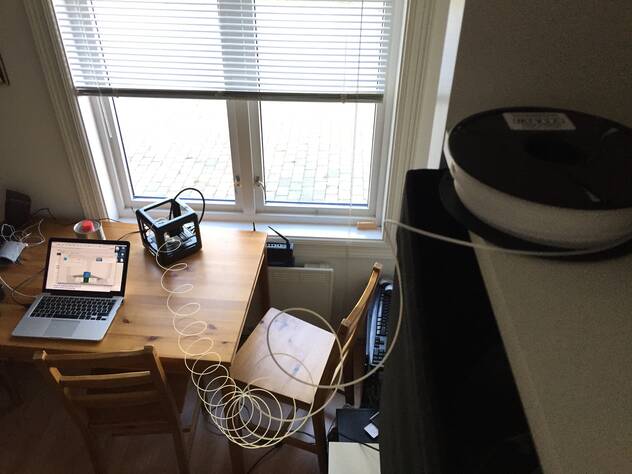
It is not recommended to use the internal spool bay on the m3d, so i use the spool externally as a telephone cord.
https://github.com/mifi/file2kodi
Play a local file on Kodi/XBMC. Send video/music etc.
The script works by setting up a web server sharing the specified file, then sending a command to Kodi to play the file on this server.
Kinda like Airplay
Large Grails application with lots of domain classes taking very long to start up very time?
Quick tip: Shave off a few seconds instantly by setting dbCreate to something other than update or validate. For instance remove it.
XBMC (now Kodi) has always had a tendency of leaking memory, so that it will eventually thrash and crash. My simple solution to this is to run xbmc inside a for loop instead of directly (just run the script from .xinitrc):
xbmc_angel.sh:
#!/bin/bash
while [ 1 ]; do
        xbmc
        nohup sleep 10
done
...And add the following to the local XBMC user's crontab:
0 4 * * * killall xbmc.bin
This will kill XBMC every night at 4 o'clock. And give you a fresh XBMC every day!
The new Pepper Flash plugin broke my old script for listing/downloading cached flash/flv videos.
Here is a new script. Uses sudo because the /proc/$PID/fd directory is root only.
This solution is based on silviot's solution here: http://superuser.com/questions/622606/how-do-i-save-the-buffered-flash-video-on-linux.
#!/bin/bash
for FLASHPID in $( pgrep -f chrom ) ; do (for FLASHFILE in $(sudo ls -l /proc/$FLASHPID/fd|egrep "(/tmp/Flash|Pepper Data)" | sed -r 's/^.* ([0-9]+) -> .*$/\1/'); do echo /proc/$FLASHPID/fd/$FLASHFILE; done ); done
Then you can just copy the file into home, like:
cp /proc/26493/fd/30 ~/
My Netgear ReadyNAS RN102 keeps constantly writing to a file /var/readynasd
I don't want to hold my breath waiting for Netgear to fix this so I took matters into my own hands and implemented a TMPFS fix for my NAS.
What it does is mount /var/readynasd as a tmpfs of 2MB, and copy files to here from /etc/readynas-db on every boot, and copy back every hour, and on shutdown.
systemctl stop readynasd
mkdir /etc/readynasd-db
cp -a /var/readynasd /etc/readynasd-db/
Edit /lib/systemd/system/tmpdb.service:
[Unit]
Description=Mount RAMFS for SQLITE DB file
Before=readynasd.service

[Service]
Type=oneshot
ExecStart=/bin/sh -c "mount -t tmpfs -o size=2m tmpfs /var/readynasd && cp -a /etc/readynasd-db/readynasd /var/"
#ExecStop=/bin/sh -c "cp -a /var/readynasd /etc/readynasd-db/" # TODO not working
RemainAfterExit=yes

[Install]
WantedBy=multi-user.target
Edit /etc/cron.daily/tmpdb-sync
#!/bin/bash
cp -a /var/readynasd /etc/readynasd-db/
Now finish up:
chmod +x /etc/cron.daily/tmpdb-sync
systemctl enable tmpdb
reboot
I needed to add some startup command to run as root on my Netgear ReadyNAS (RN102). Turns out you don't have any /etc/rc.local, so I added a new boot script /etc/init.d/local:
#! /bin/sh
### BEGIN INIT INFO
# Provides:          local
# Required-Start:    $all
# Required-Stop:
# Default-Start:     2 3 4 5
# Default-Stop:
# Short-Description: Local scripts
# Description:       Local scripts
### END INIT INFO

PATH=/sbin:/bin
. /lib/init/vars.sh

do_start () {
        hdparm -S 253 /dev/sdc
}

case "$1" in
  start)
        do_start
        ;;
  restart|reload|force-reload)
        echo "Error: argument '$1' not supported" >&2
        exit 3
        ;;
  stop)
        # No-op
        ;;
  status)
        echo "Error: argument '$1' not supported" >&2
        exit 3
        ;;
  *)
        echo "Usage: $0 start|stop" >&2
        exit 3
        ;;
esac

:
Just type whatever u need inside do_start. I needed to set a higher spindown timeout.
Then:
chmod +x /etc/init.d/local
update-rc.d local defaults
Tested on ReadyNASOS 6.1.6
I made a Vovoid VSXu (vsxu.com) visualization for XBMC. Linux only, so far.
Still having problems getting some of the presets working tho, don't know why.
Can be checked out and compiled here: https://github.com/mifi/xbmc-vsxu