
11 posts tagged with "tips"

View All Tags

Migrate WordPress URLs to nginx (hexo)

· 2 min read

I have migrated my blog from WordPress to hexo, but the old URLs need to be permanently redirected. I'm using NGINX as my web server, so I set up some rules for redirecting the old posts to the new URLs. It's a bit tricky because WordPress used query string param for identifying the page, but it can be sorted out using if and the NGINX $arg_ variable. In order to generate these rules, I wrote a simple node script that runs through the exported Markdown files from WordPress. Markdown files were exported using Jekyll Exporter plugin.)
DJI Phantom 3 parallel battery charging in a car with iMax B6

· 2 min read

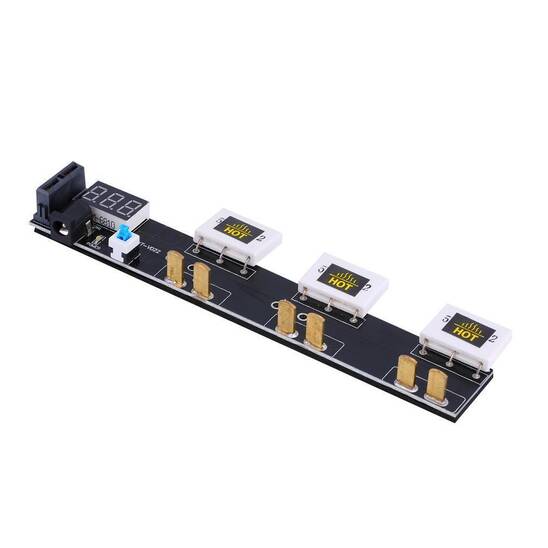
I bought a "Multi Battery Parallel Charging Board For DJI phantom3" on ebay, and I soldered on a deans female connector for connecting it to my iMax B6 charger.

Since the Phantom 3 battery is intelligent and has its charging circuitry in the battery itself, the iMax will just work as a voltage booster with an output of 18V. This is 0.5V more than the DJI charger provides but it seems to work. So anything that can output >3A ~17.5V should be able to replace the iMax.
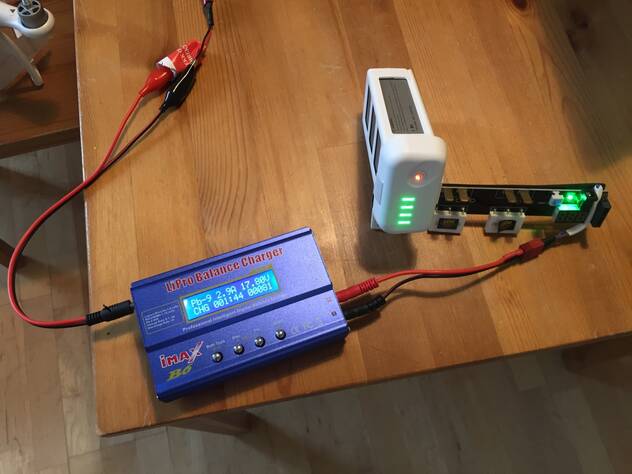
  1. Connect iMax input to car cigarette connector
  2. Connect iMax output to the multi-charging board.
  3. Connect the Phantom battery to the board
  4. Choose Pb charge, 5.0A, 18.0V (9P)
  5. Turn the battery on right before long-pressing start on the iMax (by using the short-then-long-press sequence on the Phantom battery.)
  6. When the battery is full it will say CONNECTION BREAK, but this is because the intelligent battery circuit will disconnect itself when fully charged.

Demo video

In the next version i will be using a cheap boost converter from ebay, like this: http://www.ebay.com/itm/150W-DC-DC-Boost-Converter-10-32V-to-12-35V-6A-Step-Up-Voltage-Charger-Power-/171907240597

References:

Time Machine backup to NTFS without installing anything

· 2 min read

Here's a way to use an NTFS drive for Time Machine backups, even though it is used for other purposes too.

Find out the NTFS drive volume's UUID:

diskutil info /Volumes/DRIVENAME | grep UUID

Put this in fstab: (Replace ENTED_UUID_HERE with the one you found from the previous command.)

sudo echo "UUID=ENTER_UUID_HERE none ntfs rw,auto,nobrowse" >> /etc/fstab

Eject, plug out and back in. MAKE SURE THE DRIVE WAS SAFELY REMOVED FROM WINDOWS, or it will not mount RW in Mac (See dmesg when plugging in).

Find your RW mounted volume

open /Volumes

Now we will create a Mac OS disk image on the NTFS volume.

  1. Open Disk Utility
  2. Click New Image
  3. Select a large enough size
  4. Format: Mac OS Extended (Journaled)
  5. Partitions: Single Partition - Apple Partition Map
  6. When done, mount this image

Now we will tell Time Machine to use this disk. It does not show up in the list of available drives, so we will use a command:

sudo tmutil setdestination /Volumes/MOUNTED-DISK-IMAGE

(Replace MOUNTED-DISK-IMAGE with the disk image you created, NOT the NTFS drive)

Now just test backing up and see that it works.

Resources:

I use this for backing up to my NAS via SMB/NFS

XBMC memory leak remedy

· One min read

XBMC (now Kodi) has always had a tendency of leaking memory, so that it will eventually thrash and crash. My simple solution to this is to run xbmc inside a for loop instead of directly (just run the script from .xinitrc):

xbmc_angel.sh:

#!/bin/bash
while [ 1 ]; do
xbmc
nohup sleep 10
done

...And add the following to the local XBMC user's crontab:

0 4 * * *       killall xbmc.bin

This will kill XBMC every night at 4 o'clock. And give you a fresh XBMC every day!

ReadyNAS RN102 constant activity remedy

· One min read

My Netgear ReadyNAS RN102 keeps constantly writing to a file /var/readynasd I don't want to hold my breath waiting for Netgear to fix this so I took matters into my own hands and implemented a TMPFS fix for my NAS. What it does is mount /var/readynasd as a tmpfs of 2MB, and copy files to here from /etc/readynas-db on every boot, and copy back every hour, and on shutdown.

Setup instructions​

systemctl stop readynasd
mkdir /etc/readynasd-db
cp -a /var/readynasd /etc/readynasd-db/

Edit /lib/systemd/system/tmpdb.service:

[Unit]
Description=Mount RAMFS for SQLITE DB file
Before=readynasd.service

[Service]
Type=oneshot
ExecStart=/bin/sh -c "mount -t tmpfs -o size=2m tmpfs /var/readynasd && cp -a /etc/readynasd-db/readynasd /var/"
#ExecStop=/bin/sh -c "cp -a /var/readynasd /etc/readynasd-db/" # TODO not working
RemainAfterExit=yes

[Install]
WantedBy=multi-user.target

Edit /etc/cron.daily/tmpdb-sync

#!/bin/bash
cp -a /var/readynasd /etc/readynasd-db/

Now finish up:

chmod +x /etc/cron.daily/tmpdb-sync
systemctl enable tmpdb
reboot

Custom pwm input range/travel in MultiWii

· One min read

I use MultiWii for my quadcopter. But I had a problem. My transmitter was not able to send values in the full range (1000-2000), so i had to scale the value from the center point (1500) up, and down.

Replace the fraction 22/20 with whatever scaling value you want, and replace THROTTLEPIN with whatever pin you want to scale.

Here are the changes I made (RX.ino in MultiWii 2.2):

@@ -110,8 +114,13 @@
rcValue[rc_value_pos] = dTime; \
if((rc_value_pos==THROTTLEPIN || rc_value_pos==YAWPIN || \
rc_value_pos==PITCHPIN || rc_value_pos==ROLLPIN) \
- && dTime>FAILSAFE_DETECT_TRESHOLD) \
- GoodPulses |= (1<<rc_value_pos); \
+ && dTime>FAILSAFE_DETECT_TRESHOLD) { \
+ GoodPulses |= (1<<rc_value_pos); \
+ if (rc_value_pos == THROTTLEPIN) { \
+ tmp = ((int16_t)dTime-1500)*22/20+1500; \
+ rcValue[rc_value_pos] = tmp; \
+ } \
+ } \
} \
} else edgeTime[pin_pos] = cTime; \
}
@@ -133,6 +142,7 @@
uint8_t mask;
uint8_t pin;
uint16_t cTime,dTime;
+ int16_t tmp;
static uint16_t edgeTime[8];
static uint8_t PCintLast;
#if defined(FAILSAFE) && !defined(PROMICRO)