
Migrate WordPress URLs to nginx (hexo)

· 2 min read

I have migrated my blog from WordPress to hexo, but the old URLs need to be permanently redirected. I'm using NGINX as my web server, so I set up some rules for redirecting the old posts to the new URLs. It's a bit tricky because WordPress used query string param for identifying the page, but it can be sorted out using if and the NGINX $arg_ variable. In order to generate these rules, I wrote a simple node script that runs through the exported Markdown files from WordPress. Markdown files were exported using Jekyll Exporter plugin.)
LosslessCut

· One min read

I needed a tool for quickly trimming recorded videos, so I built my first Electron app, check it out: https://mifi.github.io/lossless-cut/

Download links: https://github.com/mifi/lossless-cut/releases

It is a cross platform simple video editor for lossless trimming / cutting of videos using ffmpeg and Electron. Great for rough processing of large video files taken from a video camera, drone, etc. Lets you quickly get rid of the useless parts. It doesn't do any decoding / encoding and is therefore very fast and has no quality loss. Also allows for taking JPEG snapshots of the video at the selected time.

Extract GPS data from "Tracker" iOS app to GPS

· One min read

Quick script for extracting gps data from the Tracker GPS app

First export data from app com.eofster.tracker using something like iPhone Backup Extractor (http://supercrazyawesome.com/)

mkdir tracker-extract && cd tracker-extract

npm install csvtojson
npm install gps-to-gpx

(cd 'com.eofster.tracker/Library/Application Support/com.eofster.tracker' && sqlite3 -header -csv Tracker.sqlite "select * from ZTRACKPOINT order by ZTIMESTAMP;" > out.csv)

Create index.js:

var Converter = require("csvtojson").Converter;
var converter = new Converter({});

const createGpx = require('gps-to-gpx').default;

//end_parsed will be emitted once parsing finished
converter.on("end_parsed", function (jsonArray) {
//console.log(jsonArray);
const converted = jsonArray.map(pos => {
return {
latitude: pos.ZLATITUDE,
longitude: pos.ZLONGITUDE,
elevation: pos.ZALTITUDE,
time: new Date((pos.ZTIMESTAMP+978307200)*1000).toISOString()
};
});

const gpx = createGpx(converted, {
activityName: 'tur',
startTime: converted[0].time,
});

console.log(gpx);
});

//read from file
require("fs").createReadStream("out.csv").pipe(converter);

Run:

node . > out.gpx

DJI Phantom 3 parallel battery charging in a car with iMax B6

· 2 min read

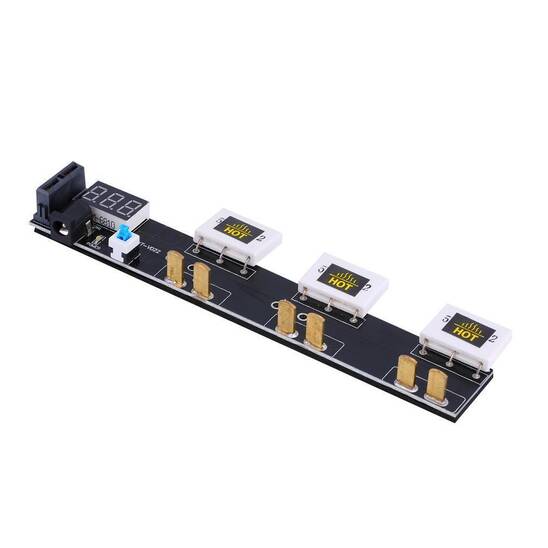
I bought a "Multi Battery Parallel Charging Board For DJI phantom3" on ebay, and I soldered on a deans female connector for connecting it to my iMax B6 charger.

Since the Phantom 3 battery is intelligent and has its charging circuitry in the battery itself, the iMax will just work as a voltage booster with an output of 18V. This is 0.5V more than the DJI charger provides but it seems to work. So anything that can output >3A ~17.5V should be able to replace the iMax.
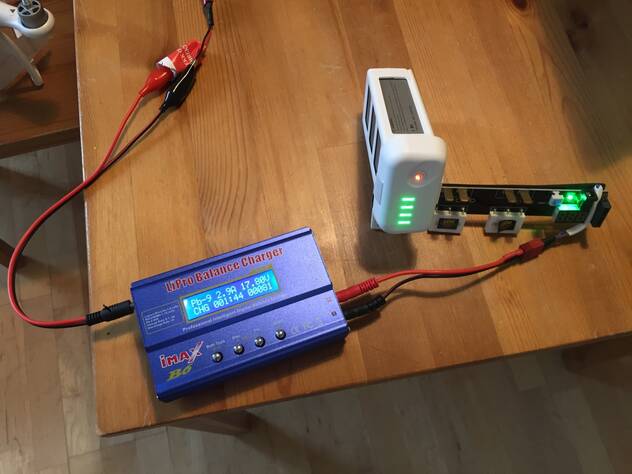
  1. Connect iMax input to car cigarette connector
  2. Connect iMax output to the multi-charging board.
  3. Connect the Phantom battery to the board
  4. Choose Pb charge, 5.0A, 18.0V (9P)
  5. Turn the battery on right before long-pressing start on the iMax (by using the short-then-long-press sequence on the Phantom battery.)
  6. When the battery is full it will say CONNECTION BREAK, but this is because the intelligent battery circuit will disconnect itself when fully charged.

Demo video

In the next version i will be using a cheap boost converter from ebay, like this: http://www.ebay.com/itm/150W-DC-DC-Boost-Converter-10-32V-to-12-35V-6A-Step-Up-Voltage-Charger-Power-/171907240597

References: